


Introduction
Every finance team faces the same reality. Invoices arrive from all directions—emails, scanned PDFs, photographs, paper copies and rarely follow a consistent format. Each one must be reviewed, entered into a system, and verified. That approach may seem workable at first, but as volumes increase and timelines shrink, it quickly becomes unsustainable.
The challenge goes beyond time. Manual invoice processing increases the risk of errors, slow approvals, and creates bottlenecks that affect accounting, procurement, and vendor relationships. A single misplaced digit can delay payments. Duplicate invoices can slip through unnoticed. Over time, these small breakdowns add up to real operational costs.
OCR invoices processing changes this dynamic. By using Optical Character Recognition to automatically capture and validate invoice data, organizations can replace manual entry with a faster, more dependable workflow. Today, OCR for invoice processing is not just about automation, it’s about improving accuracy, visibility, and giving finance teams the freedom to focus on higher value work.
What Is OCR Invoice Processing?
OCR invoice processing offers a more efficient way to manage invoices without relying on manual data entry. OCR, or Optical Character Recognition, reads texts from scanned documents, PDFs, and images and converts it into structured, machine-readable data.
In everyday finance operations, this means invoice information is captured automatically instead of being typed in. Details such as invoice numbers, dates, supplier and customer names, line items, taxes, and totals are extracted in seconds. The endless cycle of typing, checking, and follow-ups emails is replaced with a faster, more reliable workflow.
What sets modern OCR invoice processing apart is its ability to handle real-world variability. Invoices don’t arrive in a single format—they come as scanned paper, emailed PDFs, mobile images, and system-generated files, each with different layouts and quality levels. Intelligent OCR solutions are built for this diversity, recognizing patterns and context rather than relying on fixed templates.
Platforms such as iCaptur apply OCR in a way that reflects how invoices actually flow through finance teams. As more invoices are processed, the system continuously improves, while built-in validation flags missing fields, mismatched totals, or potential duplicates early. Human review remains available when needed, without slowing the overall process. The result is a faster, cleaner, and more dependable invoice workflow that brings clarity and control to finance operations.
Difference Between Manual and OCR Invoice Data Extraction
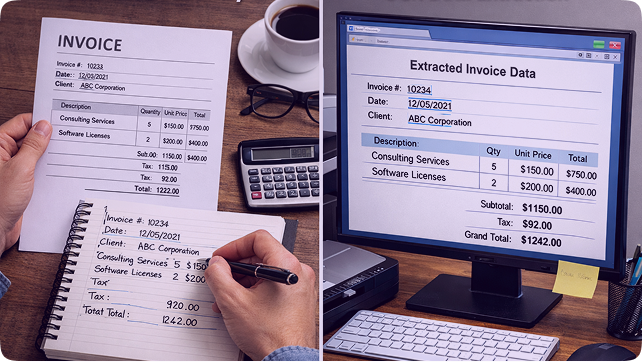
Manual invoice data extraction is the traditional approach in which finance teams read each invoice and enter key details such as vendor name, invoice number, dates, and amounts into a spreadsheet or accounting system. The process involves sorting invoices, entering data, and validating it against purchase orders or internal records. It is time-consuming, difficult to scale, and prone to errors, especially when invoices arrive in large volumes or inconsistent formats.
OCR invoice data extraction takes a different approach. Using Optical Character Recognition, invoices are automatically read—whether scanned, photographed, or digital, and key information is captured without manual typing. Advanced OCR tools use AI and machine learning to identify fields across varying layouts and improve accuracy over time. Extracted data flows directly into accounting or ERP systems, reducing manual effort and accelerating processing.
In practical terms, the contrast is clear:
- Speed and efficiency: OCR processes thousands of invoices in minutes, while manual entry takes significantly longer.
- Accuracy: AI-driven OCR reduces human error; manual processes are vulnerable to typos and inconsistencies.
- Scalability: OCR scales easily with volumes grow; manual extraction is limited by staff capacity.
- Human involvement: OCR allows teams to focus on exceptions rather than constant data entry.
- Integration and security: OCR integrates with enterprise systems and supports secure digital workflows, while manual processes often rely on spreadsheets and physical files.
Manual extraction depends heavily on time and labor. OCR-based extraction introduces automation, consistency, and reliability, making it far better suited to modern finance teams.
How OCR Transforms Invoice Processing
OCR has reshaped how invoices move through finance workflows. What was once slow, manual, and repetitive is now a streamlined, technology-driven process built for speed and accuracy. Instead of spending hours reading and entering data, teams benefit from intelligent automation at the very first step.
As soon as an invoice is received via email, scan, or upload, OCR technology reads the document and captures essential details such as invoice numbers, dates, vendor information, line items, taxes, and totals. Unstructured data is converted into clean, structured records in seconds, cutting processing time from days to near real time.
Accuracy and consistency improve dramatically. Manual entry is vulnerable to mistakes, especially during peak periods. OCR applies standardized extraction logic and validation rules, flagging mismatches, verifying totals, and identifying duplicate invoices before they move further in the workflow.
Approvals also move faster. With reliable data available immediately, invoices progress smoothly through reviews, enabling timely payments and stronger vendor relationships. By removing repetitive tasks, OCR allows finance teams to focus on oversight, exception handling, and strategic work—turning invoice processing into a dependable business function rather than an operational burden.
Step-by-Step OCR Invoice Processing Workflow
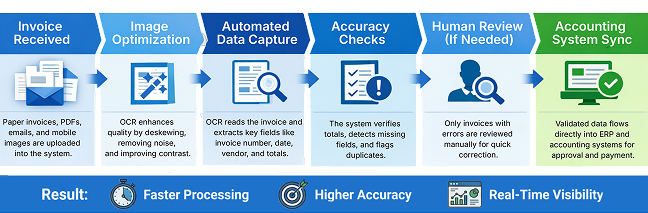
An OCR-driven invoice workflow transforms a fragmented, paper-heavy process into a streamlined digital operation. From capture to integration, each step improves speed, accuracy, and visibility.
Step 1: Document Capture and Upload
The workflow begins when an invoice arrives. Paper invoices are scanned, while digital invoices—PDFs, email attachments, or mobile images are uploaded directly into the OCR platform. All invoices are centralized in a single digital queue, reducing the risk of lost or overlooked documents.
Step 2: Image Preprocessing for Accuracy
Before any text is read, the system prepares the invoice image for optimal recognition. Automated preprocessing corrects common issues such as skewed scans, poor lighting, shadows, or background noise. Techniques like deskewing, contrast enhancement, and noise reduction help standardize the document, ensuring the document is ready for accurate extraction.
Step 3: Recognizing Printed and Handwritten Text
Once the image is optimized, the OCR engine analyzes it to recognize both printed and handwritten text. Modern OCR solutions use AI and machine learning to understand different fonts, layouts, and writing styles, allowing accurate processing even when invoices vary widely or include handwritten notes.
Step 4: Extracting Key Invoice Data
After text recognition, the system intelligently converts raw text into structured data by identifying relevant invoice fields. Rather than relying on rigid templates, advanced OCR understands context and patterns. Key data points typically extracted includes:
- Header information: Invoice number, issue date, due date
- Party details: Supplier or vendor name and address, customer information
- Financial data: Line item description, quantities, unit prices, taxes (such as GST or VAT), subtotals, and total amounts
This structured data is then prepared for validation and further processing.
Step 5: Data Validation and Verification
Extracted data is checked through automated validation rules to ensure accuracy and consistency before invoices move forward. This includes identifying incorrect totals, missing mandatory fields, inconsistent supplier details, and potential duplicates. Invoices that fail these checks are flagged early, preventing downstream issues.
Step 6: Manual Review for Exceptions
At this stage, human review is applied only when necessary. The system flags invoices that show potential issues such as missing fields, mismatched totals, or unusual values. Reviewers then step in to check for errors and inconsistencies, ensuring the extracted data aligns with the original invoice and internal business rules.
If needed, manual verification allows teams to correct edge cases, validate unclear information, or approve exceptions with confidence. Because OCR handles the majority of invoices accurately, this review process is focused and efficient, saving time while maintaining a high level of data integrity.
Step 7: Integration with Accounting Systems
Validated data is seamlessly integrated into accounting and ERP platforms such as SAP, Oracle, Microsoft Dynamics, QuickBooks, Xero, and Sage. This eliminates re-entry, supports real-time posting, and ensures invoices move smoothly into approvals, payments, and reporting.
This integration enables automatic data flow into financial systems, ensuring invoice details are posted accurately and in real time. As a result, invoices move smoothly into approval workflows, payment scheduling, and financial reporting. Finance teams gain better visibility into invoice status, faster processing cycles, and more reliable records—closing the loop from invoice capture to reconciliation with minimal manual effort.
Benefits of Using OCR for Invoice Processing
Adopting OCR for invoice processing delivers far more than simple automation. It reshapes how finance teams manage invoices, bringing efficiency, accuracy, and control into everyday operations.
- Faster invoice processing through automated data capture and routing.
- Reduced manual data entry and significantly fewer human errors
- Improved accuracy and consistency across all invoice records
- Shorter approval cycles and quicker payment processing
- Better vendor relationships due to timely, error-free payments
- Real-time visibility into invoice status, cash flow, and liabilities
- Easier compliance with clear digital audit trails
- Simplified audits using standardized, searchable records
- Enhanced data security by reducing physical documents and manual handling
- Seamless scalability as invoice volumes grow
- Frees finance teams to focus on exceptions, analysis, and strategic work
Conclusion
OCR invoice processing is now a core capability for finance teams seeking to move beyond manual, error-prone workflows. By automating data extraction, validation, and system integration, OCR brings speed, accuracy, and consistency to the entire invoice lifecycle. It reduces bottlenecks, improves visibility, and supports smarter financial decisions without increasing workload. As businesses scale and operations become more complex, OCR provides the reliability and flexibility needed to keep finance functions efficient, compliant, and future-ready.
FAQ
1. What data can OCR extract from invoices?
OCR extracts invoice numbers, dates, vendor and customer details, line items, taxes, subtotals, totals, and payment information.
2. Can OCR extract handwritten invoice details?
Yes. Modern OCR uses AI to recognize handwritten text, with accuracy depending on handwriting clarity and image quality.
3. How accurate is OCR invoice processing?
With quality inputs and validation rules, OCR typically achieves accuracy levels that meet or exceed manual data entry.
4. How quickly can OCR process invoices?
Invoices can be processed in seconds, enabling near real-time extraction and validation.
5. Is OCR invoice processing compatible with ERP systems?
Yes. OCR integrates with platforms such as SAP, Oracle, QuickBooks, and Microsoft Dynamics.
6. Can OCR detect duplicate invoices?
Yes. OCR compares invoice numbers, amounts, and vendor details to flag potential duplicates.
7. What are the common challenges in OCR invoice processing?
Low-quality scans, inconsistent layouts, and unclear handwriting can impact results, though preprocessing and validation help address these issues.
Enhancing your workflow through
AI integration is key to future success.
processes and improve efficiency!